Skip to content
LectureSpeed

Watch your lectures faster than 2x.

Panopto and Echo360 stop at 2x. LectureSpeed lets you pick any speed, and keeps it there. Free Chrome extension.

Available in the Chrome Web Store

Works in Chrome and Edge. No account needed.

Intro to Statistics – Lecture 4
19:48 / 1:15:00
This 75-minute lecture takes 1:15:00

Playback speed

Tested on Panopto and Echo360.

Try it: press D to go faster, S to slow down, like in the extension.

💻 Open this page on your computer to install.

Try Pro free for 7 days

Get hours back every week.

Three hours of lectures a week at 2.5x takes 1 hour 12 minutes. That's 1 hour 48 minutes back, every week.

3 h
1 h20 h
Your speed

You save 27 hours this semester.

At 2x you'd save 23 hours. Going past 2x gives you 4 more.

Compared with 1x, over a 15-week semester.

Add to Chrome, it's free

Three steps. One minute.

  1. Step 1

    Add LectureSpeed to Chrome.

  2. Step 2

    Open a lecture on Panopto or Echo360.

  3. Step 3

    Press D to go faster, S to slow down, R to reset.

Your speed stays set after pause, seeking and the next lecture.

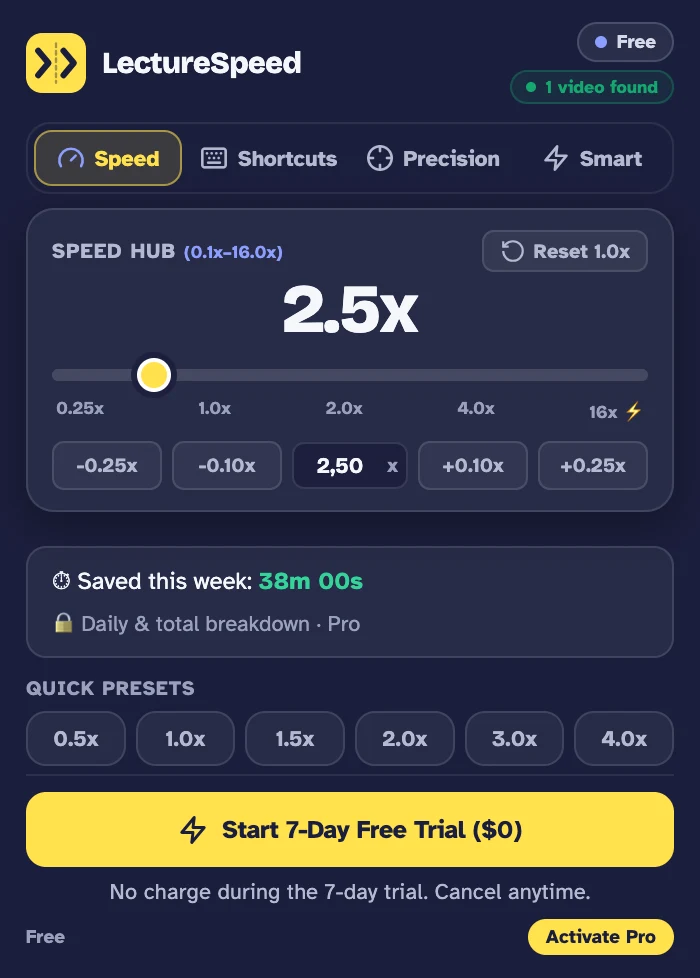
The extension's popup on a lecture: speed set to 2.5x, with the time saved this week.

Will you still understand it?

In a UCLA study, students who watched lectures at 1.5x and 2x scored only slightly lower than at normal speed. At 2.5x, scores dropped more. Start at 2x, go up while you can follow, slow down on the hard parts.

Faster is free. Remembering is Pro.

Pro turns a fast lecture into exam notes.

Bookmarks with notes

Mark "this will be on the exam" and jump back in one click.
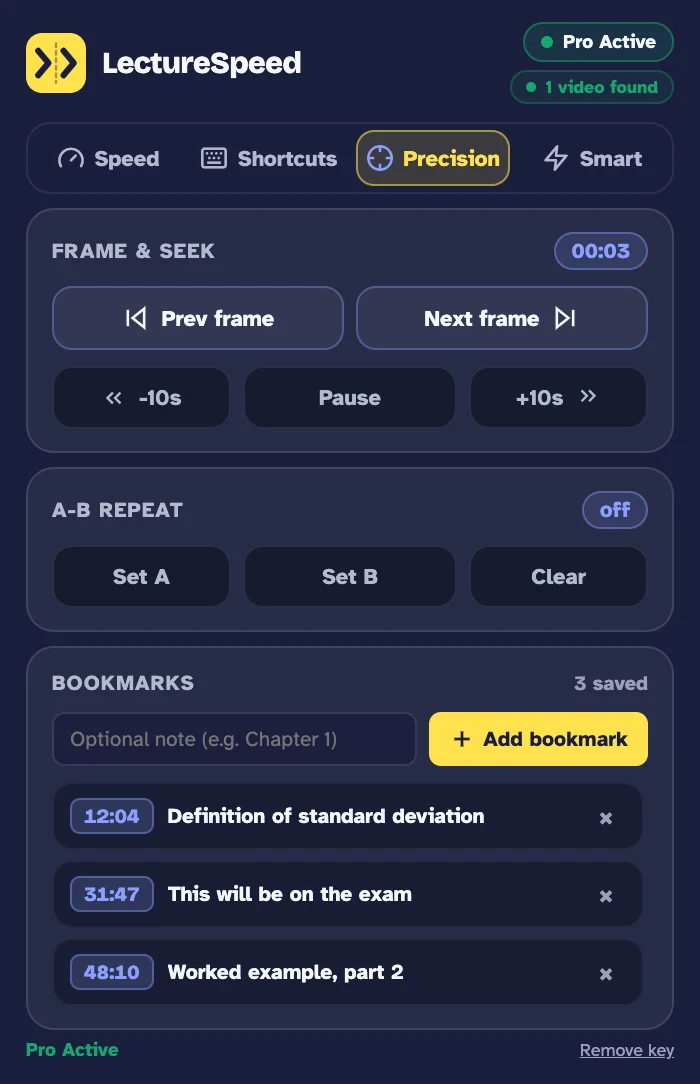
The extension's Precision tab: frame-by-frame buttons, A-B repeat and three saved bookmarks at 12:04, 31:47 and 48:10.
  • A-B loop.

    Replay the hard part until it clicks.
  • Frame by frame.

    Stop exactly on the slide or formula.

The extension's real speed badge, set to 2.5x.Also: your speed saved per site, study stats, custom shortcuts.

Pricing

Free

$0 forever

  • No 2x limit
  • Any speed from 0.1x to 16x
  • Shortcuts: D, S, R
  • Time-saved counter
Add to Chrome

Pro

7 days free

$4.99 a year

About 42 cents a month.

  • Everything in Free
  • Bookmarks with notes
  • A-B loop and frame by frame
  • Speed saved per site, study stats, custom shortcuts
Start your 7-day free trial

Cancel anytime. 14-day refund.

On your phone? Start the trial now, your key arrives by email.

No account. No tracking. Your settings stay in Chrome. Privacy policy

Questions

Does it work at my university?
If your lectures are on Panopto or Echo360, it should. Every university has its own address for them, like yourschool.hosted.panopto.com, and LectureSpeed knows all of Panopto's and Echo360's cloud addresses. If it doesn't work on yours, email me the link and I'll fix it.
The player still says 1x. Is it working?
Yes. Panopto's and Echo360's speed button only shows what you picked in their own menu. LectureSpeed changes the speed of the video itself: check the popup, or the badge that appears on the video when you change speed.
My speed keeps jumping back to 1x.
Some players, Echo360 especially, reset the speed when you pause or skip. LectureSpeed puts yours back straight away. If it still happens, check you don't have another speed extension turned on: two of them will fight over the video.
Why does it need access to all websites?
Lectures live on hundreds of university addresses, and Chrome calls access to all of them “Read and change all your data on all websites”. In practice LectureSpeed only looks for video players and listens for its own shortcut keys. What you watch never leaves your browser: the only thing it sends is the Pro license check.
Can I change how much D and S change the speed?
Yes. Each press is 0.1x by default. You can set any step from 0.01x to 1x in the settings, on the free plan too.
Does it work on my phone or iPad?
No. Chrome on phones and iPads doesn't run extensions. Use it on a laptop or desktop with Chrome or Edge.
Can it download lectures?
No, and it won't. It only changes how fast they play.
What's free and what's Pro?
Going past 2x, the shortcuts and the time-saved counter are free, for good. Pro is $4.99 a year and adds bookmarks with notes, the A-B loop, frame-by-frame, speed saved per site and study stats.
How do I cancel Pro?
Use the link in your receipt email. Pro stays on until the end of the year you paid for, and you can get a refund within 14 days.
I bought the old lifetime license. Do I keep it?
Yes. Your key keeps working. Nothing to do.

Your next lecture, in half the time.

Add to Chrome, it's free

Works in Chrome and Edge. No account needed.

💻 Open this page on your computer to install.